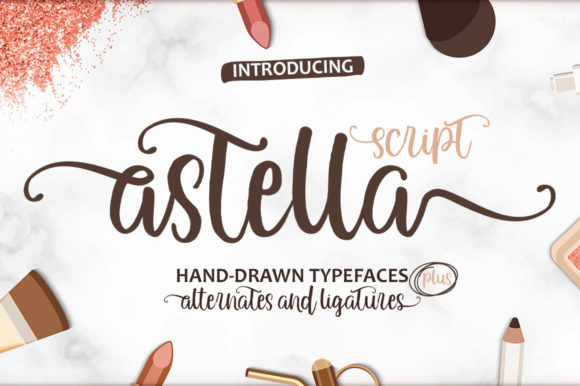
Astella Script: A Handmade Seller’s Go-To Font for Labels, Signs, and Printables
If you spend any time browsing font catalogs as a small shop owner or printable creator, you know the feeling of scrolling past dozens of scripts that all look the same. They are either too delicate to cut on a machine, too fancy to read on a sticker, or too rigid to feel handmade. That is why Astella Script caught my attention immediately. It is a script font inspired by classic typography, but it brings a fresh, approachable personality that works beautifully in actual craft and product work. Whether you are printing labels for your candle line, designing wedding invitations, or creating SVG templates for other makers, this typeface holds up well under real production conditions.
What Makes Astella Script Different from Other Script Fonts
Astella Script strikes a balance that is hard to find. Many script fonts lean either toward ultra-formal calligraphy or toward a messy, hand-drawn look. Astella sits somewhere in the middle. It has a refined, classic structure, but it does not feel stiff or old-fashioned. The letterforms are smooth and connected, with natural flow and subtle variation in stroke weight. That gives it a handcrafted appearance without sacrificing clarity. When I look at a word set in Astella Script, I can actually read it without squinting. That matters when you are putting a font on a small product label or a 2-inch sticker. The font keeps its charm even at reduced sizes, which is not something I can say for every expressive script on the market.
For a crafter or handmade seller, the visual personality of a font is often the first thing a customer notices about your product. Astella Script communicates warmth, care, and a touch of elegance. It suggests that the item was made with attention to detail, whether it is a soy candle, a wedding welcome sign, or a set of printable art prints.
Using Astella Script for Labels, Packaging, and Product Tags
Product labels are one of the most common places where a font either elevates or undermines the perceived quality of an item. A poorly chosen font can make a handmade soap look cheap, no matter how good the ingredients are. Astella Script, on the other hand, adds a layer of professionalism while still feeling personal. I have used it for candle labels where the product name is set in Astella, paired with a simple sans serif for scent notes and ingredients. The script draws the eye to the brand name first, then the supporting text is clean and easy to scan.
For boutique clothing tags, the font works well for the shop name or a short tagline. Because the letterforms are not overly ornate, the text stays legible on small hang tags made from kraft paper or cotton ribbon. I also tested it on a mockup for a tote bag design, and the script scaled up nicely without losing its smooth character. Astella Script handles both small and large sizes gracefully, which makes it versatile across a product line.
When it comes to food product packaging, such as honey jars, spice blends, or baked goods, Astella Script gives a homemade feel that customers trust. It does not look mass-produced. It looks like someone carefully wrote the label by hand, which is exactly the aesthetic many small food businesses want to project.
Invitations, Stationery, and Wedding Printables
One of the strongest uses for Astella Script is in the invitation and stationery space. If you sell printable wedding suites, birthday invitations, or greeting cards on Etsy, you need a script that feels romantic but also works for names, dates, and short phrases. Astella Script is ideal for couples names on a save-the-date, the main heading on a bridal shower invitation, or the wording on a thank-you card. It has enough elegance to suit a formal wedding but still feels warm enough for a casual backyard celebration.
For greeting cards, I like using Astella Script for the sentiment line. A phrase like “thinking of you” or “celebrate today” set in this font reads as heartfelt and intentional, not generic. Because the font includes alternates and ligatures (details worth checking in your purchased version), you can create a hand-lettered look without needing design software skills. That is a huge time saver for small shop owners who want variety across their product listings without starting from scratch each time.
Wall Art, Signs, and Home Decor Projects
Farmhouse-style signs, framed quotes, and decorative wall art are popular categories on craft marketplaces. Astella Script fits right into that space. I have used it for a “gather” sign in a SVG file format, and the cut lines were clean enough for a Cricut to process without extra nodes or jagged edges. The font’s smooth curves translate well into physical materials like vinyl, adhesive foil, and heat transfer. If you sell cut-ready SVG designs or layered templates, Astella Script is a reliable choice because the letter spacing is consistent and the joins between characters are natural.
For seasonal craft projects, such as Christmas gift tags, Halloween treat bags, or Easter signs, Astella Script adds a handmade touch that makes the finished product feel special. It does not compete with decorative elements like flourishes or illustrations. Instead, it complements them. You can pair it with a simple sans serif font for subtext and let the script be the star of the design.
Readability and Practical Advice for Cutting Machines
As someone who uses a cutting machine regularly, readability is not just about how the font looks on screen. It is about whether the letters cut cleanly at small sizes, whether the thin strokes disappear when weeded, and whether the spacing needs manual adjustment. Astella Script handles these challenges well. The stroke thickness is consistent enough that small text on a 1-inch sticker remains intact after cutting. For vinyl projects, I recommend sizing the text at least 0.5 inches tall for best results, though you can go smaller if you are using a detailed matte vinyl or adhesive foil.
When printing on paper for cards or printables, Astella Script holds up at 12-point size and above. Below that, the script starts to lose some of its personality, so I keep it to headings, names, and short phrases rather than body copy. That is typical for any script font, and Astella actually performs better than many in this range.
If you are designing digital templates or mockups, the font’s OpenType features give you options to customize the look. Swashes and alternates let you avoid repeating the same letterforms across multiple products, which is especially useful for monogram designs or personalized items.
Font Pairing Ideas with Astella Script
Pairing Astella Script with a complementary typeface is straightforward because the font has a classic, neutral personality. It does not demand too much attention, which means you can pair it with several styles without creating visual conflict.
- Astella Script with a clean sans serif: This is my default pairing for product labels and packaging. The sans serif handles ingredient lists, prices, and barcode text, while Astella carries the brand name. Look for a sans serif that is slightly geometric but has humanist qualities, such as a lowercase a or g with openness.
- Astella Script with a simple serif: For wedding stationery or formal invitation suites, pairing the script with a serif typeface for body text creates a classic, layered look. The serif adds a sense of tradition and weight, while Astella provides the emotional pull.
- Astella Script paired with a bold display font: This works well for signs, wall art, or social media graphics where you want contrast. Use the bold display font for a single strong word and Astella for the supporting line. Just make sure the bold font does not clash in mood. Stick to modern, clean display faces rather than decorative ones.
- Astella Script alone: For shorter text, such as a shop name on a tote bag or a single word on a mug, the font holds its own without a partner. Let it breathe with generous spacing and a simple layout.
When pairing fonts, always test the combination at the actual size you will use. What looks balanced on screen at 72 points may feel crowded on a 2-inch label.
File Formats and Practical Setup Notes
Most commercial versions of Astella Script include common file formats like OTF, TTF, and sometimes WOFF for web use. For physical product design, OTF is generally preferred because it handles OpenType features such as ligatures and alternates more reliably. If you are working in design software like Adobe Illustrator, Affinity Designer, or Inkscape, make sure you enable OpenType features from the character panel to access alternate glyphs.
Multilingual support is another factor that matters if you sell to an international audience. Based on the font’s classic inspiration, Astella Script typically covers a broad Latin character set, which is helpful for names and phrases in many European languages. Always verify the included character set in your specific license before listing products with non-English text.
Commercial Licensing and Selling Physical Products
If you are a small shop owner selling physical items, digital templates, or SVGs, commercial font licensing is not optional. It is the foundation of your business’s legality and professionalism. Astella Script, like any premium font, comes with a license that specifies how you can use it. For craft sellers, the most common needs are:
- Physical products: Selling items with the font printed, etched, or applied onto a surface such as mugs, shirts, signs, or labels. Most standard desktop licenses cover this, but confirm that there is no cap on the number of units you can produce.
- Digital templates and printables: If you sell editable Canva templates, Adobe Illustrator files, or PDF printables that include the font, the license typically requires that the font is embedded or outlined, or that the customer purchases their own license. You cannot simply include the font file for download.
- SVG and cut file designs: For SVG bundles sold on Etsy or Creative Market, the font must be converted to outlines so the customer does not need the font installed. Some licenses permit this, while others require an extended license. Read the terms carefully.
- Client work: If you design logos, invitations, or packaging for clients, a standard desktop license usually allows you to use the font in client projects as long as the client does not need the font file itself.
When in doubt, contact the font foundry directly or check the license PDF that comes with your purchase. It is worth paying for a commercial license upfront rather than risking a takedown notice or legal issue later.
Why Astella Script Belongs in Your Craft Font Collection
Astella Script earns a permanent spot in my font library because it does what a good script should do: it makes products look better without requiring hours of manual adjustment. The letterforms are beautiful but not fragile. The style is classic but not dated. Whether you are designing a candle label, a wedding invitation, a farmhouse sign, or a printable art print, this typeface helps you communicate care and quality to your customers. For anyone selling handmade goods or creative templates, that is exactly what a premium font should deliver.